Creating a billing contract template (Occupancy users)
Last updated: February 27, 2026
Pro feature: This feature is available on Pro plans only. If you’d like to upgrade your plan, please contact our support team.
Overview
A billing contract template is a reusable configuration that defines how you bill funders for care services in Found. For occupancy users, these templates streamline your billing process by allowing you to track funding sources and apply them across multiple service users.
Billing contract templates save time and ensure consistency when setting up new resident billing arrangements. Instead of manually configuring payment details for each new admission, you select a pre-configured template that automatically applies the funding terms
Why billing contract templates are useful
Consistency: Ensure all funders of the same type are billed using the same terms
Efficiency: Reduce setup time when onboarding new residents by selecting a pre-made template
Accuracy: Minimise errors by configuring billing rules once rather than repeatedly
Flexibility: Create different templates for different funding types (private, local authority, NHS)
How to create a billing contract template
Step 1: Navigate to billing contract templates
From the main menu, go to Operations > Billing contracts > Templates
Click Add template in the righthand corner
Choose either the Individual or Organisation tab depending on the funder type
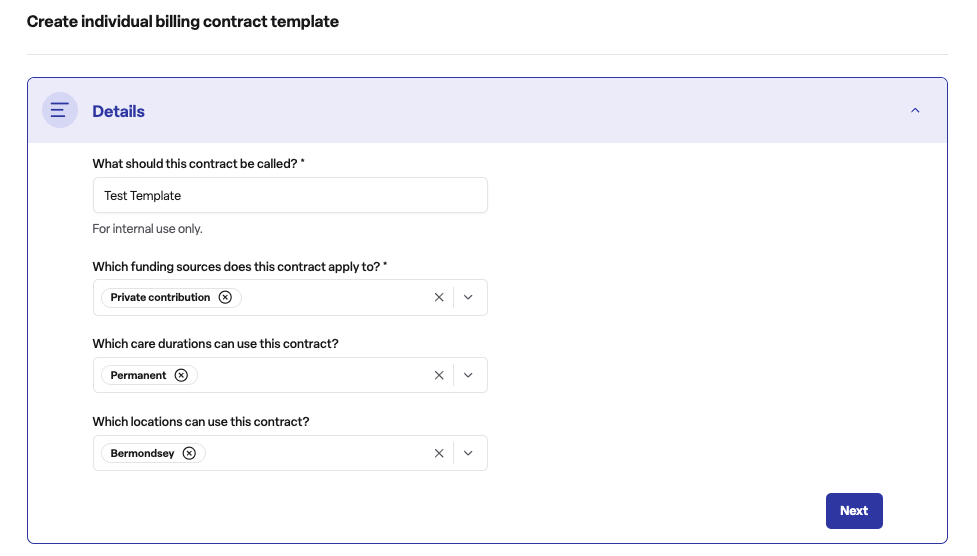
Step 2: Enter template details
Details section:
Template name: Enter a descriptive name for internal use (e.g., "Private weekly - permanent care")
Funder type: Select whether this template applies to individual or organisation funders
Care duration types: Choose whether this template is for permanent care, respite care, or both
Care duration types: Choose whether this template is for permanent care, respite care, or both
Locations: Choose which care home locations can use this template
Step 3: Contract
Contribution unit: Select the contribution unit
Step 4: Document setup
Payment method: Select how the funding will be paid for
Step 5: Save the template
Review all settings
Click Save to create the template
The template will now appear in your billing contract templates list and can be applied to new funder arrangements at a booking level
Frequently asked questions
Q: What is the difference between individual and organisation billing contract templates?
A: Individual templates are used when billing a person directly, such as a family member paying private contributions. Organisation templates are used when billing an organisation, such as a local authority or NHS trust.
Q: Can I edit a billing contract template after creating it?
A: Yes, you can edit existing templates. However, changes will only apply to new billing arrangements created using the template. Existing billing contracts already assigned to service users will retain their original settings.
Q: How many billing contract templates can I create?
A: There is no limit. You can create as many templates as needed to cover your different billing scenarios, funding types, and care arrangements.
Q: Can I use one template for multiple locations?
A: Yes, when creating a template you can select multiple care home locations that can use it. This is useful if you have standardised billing terms across your organisation.
Q: What billing sources can I include in a template?
A: Found supports various funding sources including private contributions, local authority funding, NHS continuing healthcare, funded nursing care, and other funder types commonly used in care settings.
Q: What is the difference between daily and weekly contribution units?
A: Daily contribution units calculate charges based on the number of days of care provided. Weekly contribution units calculate charges based on whole weeks. Choose the option that matches how you typically bill your funders.