Converting a respite booking to a permanent booking
Last updated: February 27, 2026
Pro feature: This feature is available on Pro plans only. If you’d like to upgrade your plan, please contact our support team.
Overview
In Found, you can convert a respite (short-term) booking into a permanent (long-term) booking when a service user decides to stay on after their temporary placement. This feature streamlines the transition process by:
Automatically closing the respite booking with the correct booking closure reason
Creating a new permanent booking linked to the original respite booking and same service user.
This is particularly useful when a trial stay has been successful and both the service user and your care home agree that a permanent placement is the right outcome.
When to use this feature
Use the conversion feature when:
A service user on a respite stay wishes to become a permanent resident
The respite period is coming to an end and a long-term arrangement has been agreed
The service user is changing contracts and not moving out of the home.
How to convert a respite booking to permanent
Step 1: Open the respite booking
Navigate to the respite booking you wish to convert. You can find this via:
Operations → Bookings → Permanent and respite tab
The service user's profile under their bookings section
A contact's profile under their associated bookings
Step 2: Access the conversion option
Click the Manage booking menu on the booking
Select Convert to permanent
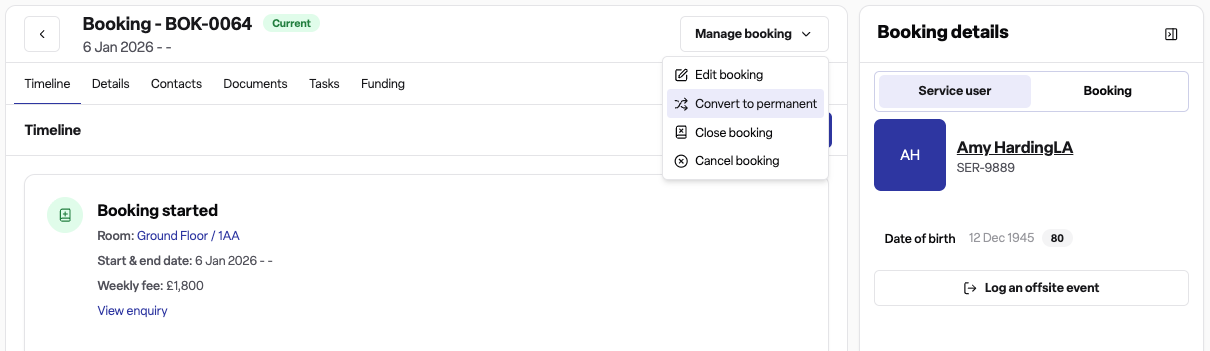
A side panel will open with the conversion form
Step 3: Complete the conversion form
Fill in the required details:
Start date – When the permanent booking should begin. This must be after the original respite start date. For bookings with a fixed end date, the start date cannot be after that planned end date.
Funding type – Select how the permanent stay will be funded (this can differ from the respite funding arrangement).
Care type – Choose the appropriate care type for the permanent placement.
Room – Select an available room. The form will show rooms that are free from your selected start date. If the current room is available, it will be suggested automatically.
Agreed fee – Enter the weekly fee for the permanent booking. A target fee is displayed for guidance.
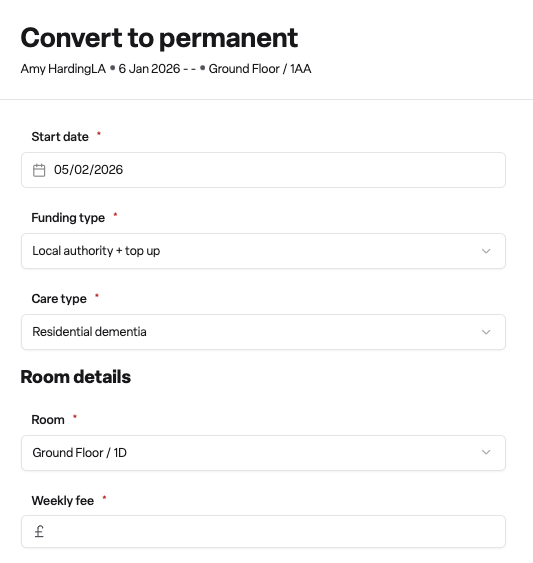
Step 4: Confirm the conversion
Click Confirm to complete the process. Found will:
End the respite booking with the reason "Respite stay converted to permanent"
Cancel any future agreed fees from the respite booking
Close the current room assignment on the respite booking
Create a new permanent booking with your specified details
Carry over the primary contact to the new booking
Not record the conversion as a move-in or move-out within the move-ins and move-outs report
You will be redirected to the new permanent booking automatically.
Important considerations
You cannot convert day care bookings – Only respite bookings can be converted to permanent
The respite booking must still be active – You cannot convert a booking that has already ended
Room availability is checked – The selected room must be available indefinitely from the conversion date
Fixed end dates are enforced – If the respite booking has a fixed end date, you cannot start the permanent booking after that date
Provisional end dates are flexible – If the end date is provisional, you can convert after that date if needed
Frequently asked questions
Q: What happens to the original respite booking after conversion?
A: The respite booking is closed with the ending reason "Respite stay converted to permanent". It remains in your records for audit purposes and is linked to the new permanent booking.
Q: Can I choose a different room for the permanent booking?
A: Yes. During conversion, you can select any available room. The system will check that the room is free from your chosen start date onwards.
Q: Can I convert a booking that has already ended?
A: No. The conversion feature is only available for active respite bookings. If a booking has already ended, you would need to create a new permanent booking manually.
Q: Is the primary contact transferred to the new booking?
A: Yes. The primary contact from the respite booking is automatically copied to the new permanent booking.
Q: What if the room I want is not available?
A: The room selection only shows rooms that are available from your chosen start date indefinitely. If your preferred room is not listed, it may have a closure scheduled or another booking. You may need to adjust the start date or choose a different room.