Sales pipeline forecast report
Last updated: October 23, 2026
Overview
The sales pipeline forecast report estimates how much new care home revenue is coming. It counts revenue in the month care is expected to start. It adds up two things:
Booked revenue: care starts that are already confirmed.
Open enquiries, weighted: revenue from open enquiries, scaled down by how likely each enquiry is to turn into a care start.
Use it to see whether the next few months look healthy and which care homes the revenue is coming from. It also shows which enquiries are missing details, which makes the numbers less accurate.
The report covers care homes only.
Where to find it
Select Reports in the main menu.
Under the CRM group, select Sales pipeline forecast.
If the report has a lock icon, your role doesn't have access to CRM reports. If it isn't listed at all, it hasn't been turned on for your workspace. See "Rules and permissions" below.
What it shows
The page has these sections, from top to bottom.
1. Location filter
Pick one or more care homes. If you don't pick any, the report includes every care home you have access to.
2. Alerts
Banners appear when prices are missing. For example, a care home may have no room prices or listing prices, or the listing prices may have failed to load. Enquiries affected by a missing price count as £0, so fix these first.
3. Chart: "How much new revenue will be booked?"
A monthly chart with two series, Booked and Open enquiries, weighted. It covers:
the last 3 months
the current month
the next 2 months
one final bar, "[month] onwards", that groups every later month
Notes under the chart list anything that was left out or counted as £0.
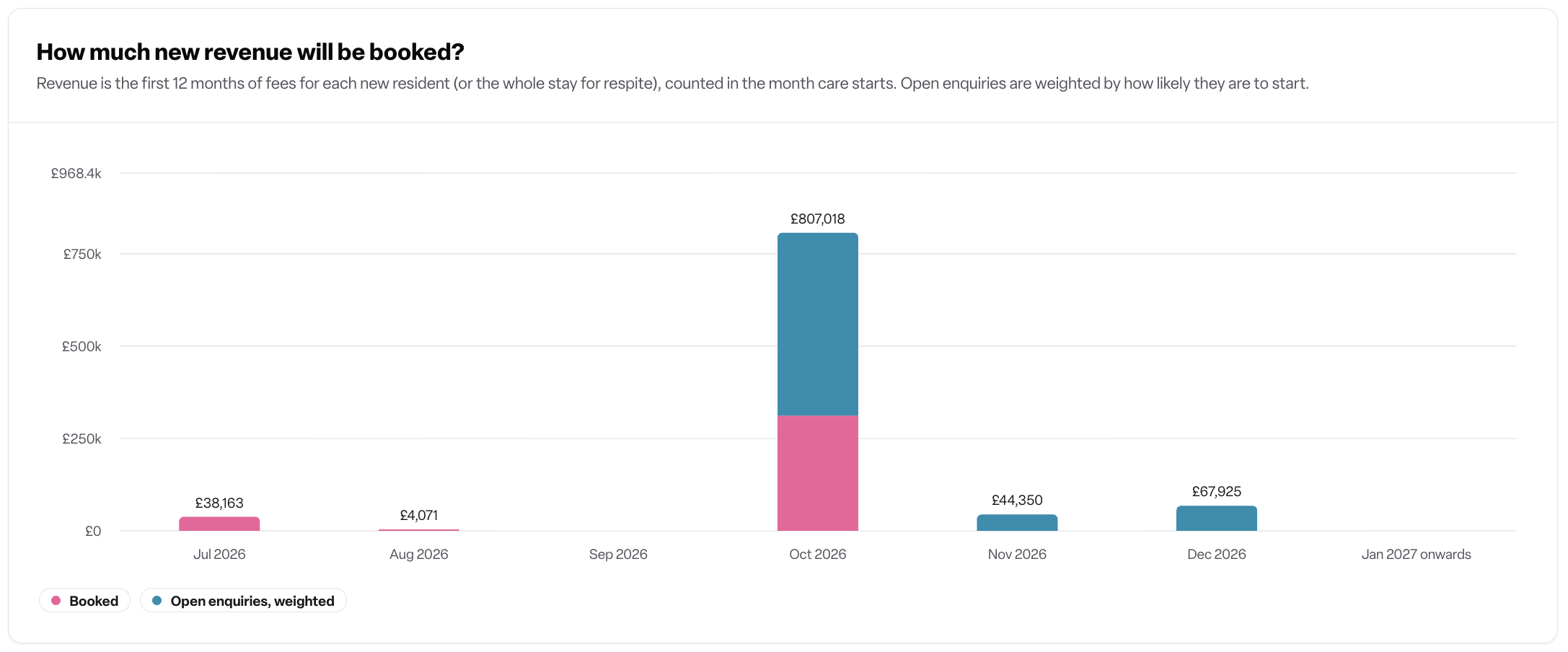
4. Table: "Where is the [month] forecast coming from?"
A breakdown by care home for one month. It opens on the current month, and you can choose another month from the menu. The columns are:
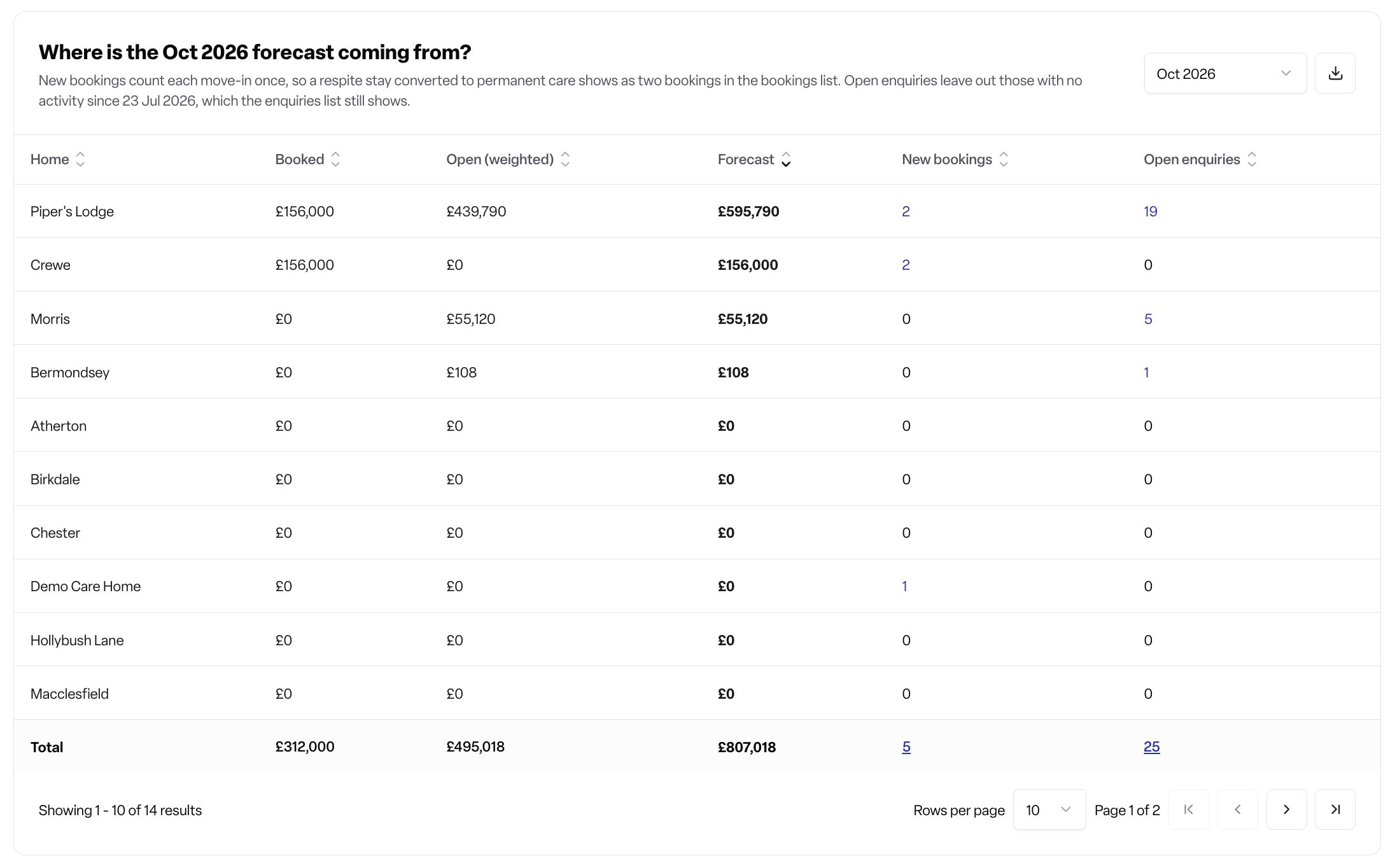
The counts link through to the bookings list and the enquiries list.
5. Improve accuracy
This section shows how much of the open forecast is estimated and links to the enquiries that need details added:
no quoted weekly fee
no expected care start month
no care duration
6. View assumptions
This section shows the rules Found uses to value enquiries:
the likelihood for each stage
the average respite stay
the average weekly fee for each location
the cut-off date for untouched enquiries
How it works
Revenue per enquiry
Value = weekly fee × weeks
Permanent care counts as 52 weeks, so the first 12 months of fees.
Respite care uses the length of the stay. If there's no end date, it uses the average respite stay, which is 2.4 weeks by default.
No care duration is treated as permanent care.
Day care is left out.
Which weekly fee is used
For open enquiries, Found uses the first of these that is available:
The enquiry's quoted weekly fee.
The care home's average room price. This only applies if you use the Occupancy module.
The care home's Lottie listing price for the enquiry's care type and duration.
The average Lottie listing price for that duration.
£0 if none of the above exist.
For booked revenue, workspaces with the Occupancy module use the booking's agreed fee. A booking with no agreed fee counts as £0.
What counts as "booked"
With the Occupancy module: permanent and respite bookings starting in the month. Cancelled bookings are excluded.
Without the Occupancy module: enquiries with a care start event in the month. Cancelled and no-show events are excluded.
Weighting open enquiries
Each open enquiry's value is multiplied by the likelihood for its current stage. The likelihoods are based on average conversion across Found:
Stage type | Likelihood |
|---|---|
Pending | 20% |
Contact attempted | 25% |
Contact successful | 40% |
Visit booked | 45% |
Visit complete | 55% |
Assessment booked | 75% |
Reserved | 80% |
Assessment complete | 85% |
Contract sent / residency booked | 95% |
Your workspace's stage names may differ. The View assumptions section shows the likelihoods against your own stage names.
Which month an open enquiry falls in
Found uses the first of these that is available:
The enquiry's expected care start month.
A month worked out from its move-in timeframe (for example, "1–3 months"), counted from the date the enquiry was created. It is never placed earlier than the current month.
If neither is set, the enquiry is left off the chart.
Untouched enquiries
Open enquiries with no activity in the last 3 months are left out of the forecast. They still appear in the enquiries list.
How to use it
Choose your care homes with the location filter.
Clear the alerts by adding missing room prices or listing prices.
Read the chart to compare booked and weighted pipeline revenue month by month.
Pick a month in the table to see which homes are driving it, then select the counts to open the underlying bookings or enquiries.
Use "Improve accuracy" to add missing fees, care start months and care durations to enquiries. The forecast gets more reliable as these are filled in.
Check "View assumptions" to understand how values were worked out.
Rules and permissions
Plan: Found Pro, with the CRM module.
Viewing: Admin, Manager and Staff users can view it by default. This is the "CRM reports" permission under Reporting.
Editing the average respite stay: Admins only by default. This is the "Sales forecast settings" permission.
Occupancy module: changes how booked revenue is worked out (bookings and agreed fees) and enables room price averages.
Location access: you only see the care homes your account can access.
Listing price averages: these show as "Not shown" if your role can't view location pricing.
Frequently asked questions
Q: Why is an enquiry counted as £0?
A: It has no quoted weekly fee, and its care home has no room prices or matching listing prices. Add a quoted weekly fee to the enquiry, or set prices for the location.
Q: Why isn't my open enquiry in the forecast?
A: There are four likely reasons. It has had no activity for 3 months. It has no expected care start month or move-in timeframe. It's for day care. Or it's at a care home outside your filter or your access.
Q: Why does "Booked" differ from what I expected?
A: With Occupancy, booked revenue comes from bookings and their agreed fees, so a booking without an agreed fee counts as £0. Without Occupancy, it comes from care start events on enquiries.
Q: Why does a respite stay that became permanent show as two bookings in the bookings list?
A: The forecast counts each move-in once. The bookings list shows the respite booking and the permanent booking as separate bookings.
Q: Can I change the stage likelihoods?
A: No. They're fixed and based on average conversion across Found.
Q: Can I change the average respite stay?
A: Yes, if you're an Admin or have the "Sales forecast settings" permission. Open View assumptions and edit the value, or select Reset to default to go back to 2.4 weeks.
Q: Does an enquiry's value cover more than one year?
A: No. Permanent care counts the first 12 months of fees. Respite counts the length of the stay.
Q: Why can't I see the report?
A: If it has a lock icon, ask your Admin for the CRM reports permission. If it isn't listed, contact Found to check that your plan includes it and that it's turned on for your workspace.