How to update your pricing
Last updated: April 22, 2026
Overview
Location pricing allows you to set the prices for different types of care services at your locations. These prices are displayed on Lottie, helping potential clients find and enquire about your services. Without pricing set, your location will not appear on Lottie for that specific care type.
This guide explains how to view and update pricing for your care home or home care locations.
⚠ Please note: the pricing update functionality is NOT available for Retirement living partners.
Before you start
Who can update pricing?
Only users with Manager or Admin roles can view and edit location pricing. If you don't see pricing options, contact your workspace administrator.
What you need to know
Minimum prices apply: Each care type has a recommended minimum price to ensure realistic market rates
Pricing affects visibility: Care types without pricing won't appear on Lottie
Changes are immediate: Price updates are reflected on Lottie straight away
Currency: All prices are in GBP (£)
Understanding pricing for care homes
Care homes can set prices for eight different combinations of care:
Permanent care pricing
Residential care - Standard residential care (minimum £600/week)
Residential dementia care - Residential care with dementia support (minimum £600/week)
Nursing care - Care with registered nursing support (minimum £600/week)
Nursing dementia care - Nursing care with dementia support (minimum £650/week)
Respite care pricing
Residential care - Short-term residential stays (minimum £600/week)
Residential dementia care - Short-term stays with dementia support (minimum £600/week)
Nursing care - Short-term nursing care (minimum £650/week)
Nursing dementia care - Short-term nursing with dementia support (minimum £650/week)
Note: All care home prices are per week.
Understanding pricing for home care
Home care services can set costs for four different service types:
Hourly care - Care visits charged by the hour (minimum £14/hour)
Overnight (sleeping) - Overnight care where carer sleeps (minimum £140/night)
Overnight (awake) - Overnight care where carer stays awake (minimum £100/night)
Live-in care - Full-time live-in carer (minimum £90/day, maximum £700/day)
Note: Live-in care is the only service type with a maximum price limit.
Important: Kindly note that all home care charges are required to follow our standard pricing structure:
Hourly care: per day
Overnight care: per night
Live-in care: per day
How to update pricing
Step 1: Navigate to your locations
From the main menu, go to Locations
Select either Care home or Home care depending on your location type
Step 2: Find your location
Use the table to locate the location you want to update. You can:
Search by location name
Filter by region or brand
Sort by any column
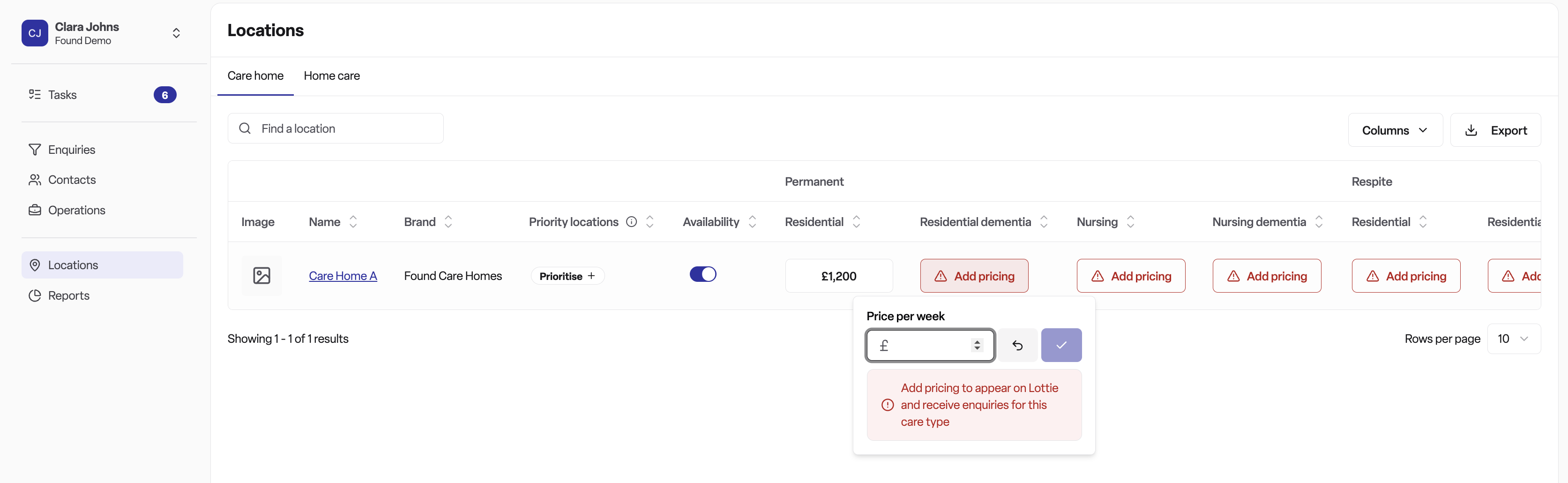
Step 3: Identify pricing columns
Look for the pricing columns in your locations table:
Care homes: You'll see columns grouped under "Permanent" and "Respite", with care type sub-columns under each.
Home care: You'll see individual columns for each service type.
Step 4: Check current pricing status
Each pricing cell shows one of two states:
Price displayed (e.g. "£750.00") - Pricing is set
"Add pricing" button - No pricing set (location won't appear on Lottie for this care type)
If a price is below the recommended minimum, you'll see a warning icon.
Step 5: Update a price
Click on the pricing button (either the price or "Add pricing")
A popup window will open
Enter your new price in the input field
The system will warn you if:
Price is below minimum
Price is above maximum (for live-in care only)
Click "Save" or press Enter to confirm
Click "Cancel" or press Escape to close without saving
Step 6: Remove pricing (optional)
To stop offering a specific care type:
Click on the pricing button
Click the "Remove" button in the popup
The pricing will be cleared and the location will no longer appear on Lottie for that care type
Tips and best practices
Setting competitive prices
Research your area: Check what similar locations in your region are charging
Consider your care quality: Premium services can justify higher prices
Stay above minimums: Prices below minimums may appear unrealistic to potential clients
Review regularly: Update prices as your costs and market conditions change
Managing multiple locations
Use the table's sort feature to see which locations need pricing updates
Look for "Add pricing" buttons to identify gaps in your pricing
Update pricing for all relevant care types to maximise enquiries
Understanding pricing warnings
Warning icon: Your price is below the recommended minimum. While you can save this price, consider whether it accurately reflects your service value and costs.
Maximum price error: Only applies to home care live-in services (£700/day cap). You cannot save a price above this limit.
Frequently asked questions
Q: Why can't I see pricing columns?
A: You need Manager or Admin role and the Location Pricing feature must be enabled for your workspace. Contact your workspace administrator.
Q: What happens if I don't set pricing?
A: Your location will not appear on Lottie for care types without pricing. Potential clients searching for those services won't see your location in their results.
If you are a new partner, please note you cannot complete your Lottie onboarding and go live on the marketplace without pricing.
Q: Can I set different prices for different locations?
A: Yes. Each location can have its own pricing. This allows you to account for regional differences, facility features, or local market conditions.
Q: Do I need to set pricing for all care types?
A: No, only set pricing for the care types you offer. If you don't provide nursing care, for example, you don't need to set nursing care prices.
Q: How quickly do price changes appear on Lottie?
A: Price updates are reflected on Lottie immediately after saving.
Q: Why are there minimum prices?
A: Minimum prices help maintain realistic market rates and ensure that prices accurately reflect the quality of care services provided.
Q: Can I set prices in pence?
A: Yes. Prices support up to two decimal places (e.g. £750.50).
Troubleshooting
I get an error when trying to save
Check that:
Your price is not below the minimum (you'll see a warning)
Your price is not above the maximum (live-in care only)
You have a stable internet connection
You have permission to edit pricing
My changes aren't saving
Ensure you clicked "Save" or pressed Enter
Check that the new price is different from the existing price
Try refreshing the page and attempting again
I can't see my location in the table
Check you're viewing the correct location type (care home vs home care)
Verify any filters you've applied aren't hiding your location
Use the search function to find your location by name