Priority locations
Last updated: November 18, 2025
Overview
Priority locations allow you to boost the marketing performance of your care home listings on the Found marketplace. When you prioritise a location, it receives enhanced visibility and positioning in search results, helping to attract more enquiries and bookings.
Key benefits:
Enhanced marketing performance on Found
Improved search positioning for your listings
Increased visibility to potential residents and their families
Flexible monthly billing with no long-term commitment
Pricing:
£140 + VAT per month per location
Rolling monthly billing - cancel anytime
Billed in 30-day cycles
Quota: You can prioritise multiple locations based on your total number of care homes. The system automatically calculates how many priority locations you're allowed based on your portfolio size. For example:
1-4 locations: 1 priority location allowed
5-9 locations: 2 priority locations allowed
10-14 locations: 3 priority locations allowed
And so on (1 additional priority location for every 5 total locations)
How to set up priority locations
Enabling priority for a location
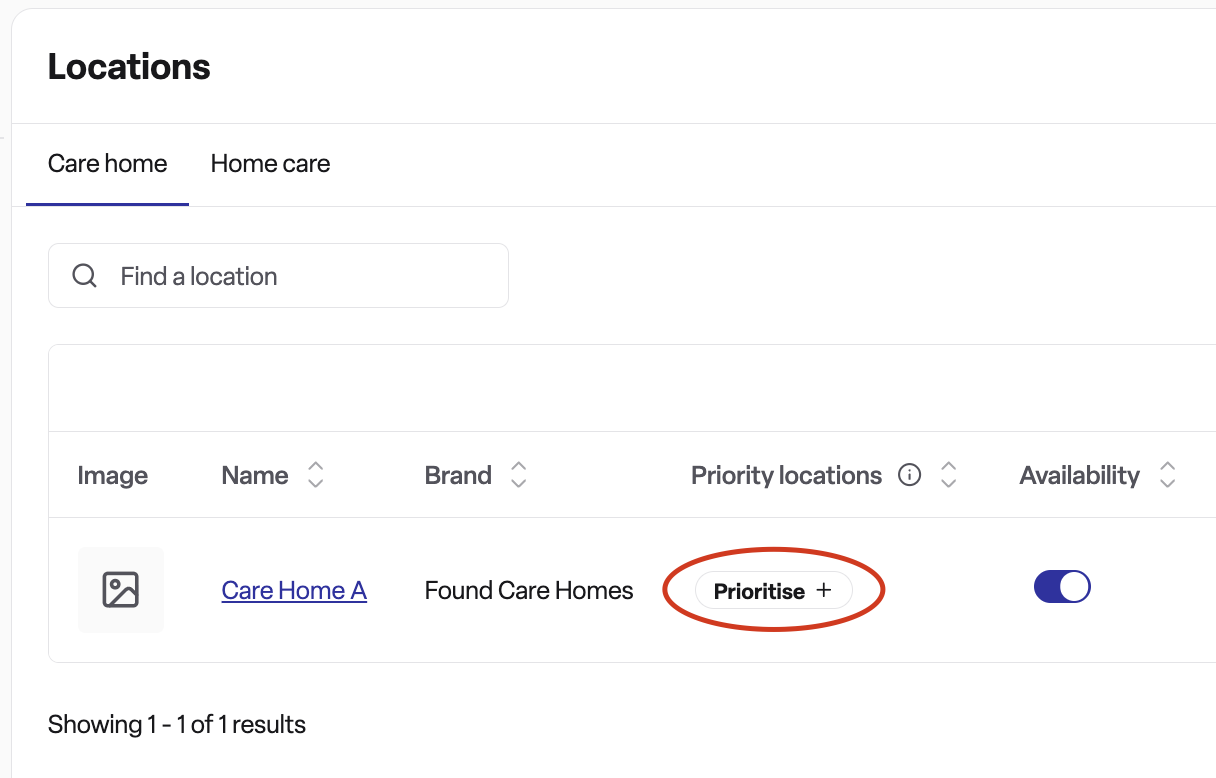
Navigate to the Locations page in your Found account
Find the location you want to prioritise in the locations table
Look for the Priority locations column
Click the Prioritise + button for your chosen location
Review the confirmation details:
Monthly cost (£140 + VAT)
Rolling monthly billing terms
How many priority locations you have remaining
Click Add priority location to confirm
Once confirmed, your location will immediately start receiving enhanced marketing performance on Found.
Removing priority from a location
Go to the Locations page
Find the prioritised location (it will show as "Active" in the Priority column)
Click Remove priority location
Review the removal details - you'll see when the priority will end
Confirm the removal
Important: When you remove priority from a location, it will continue to receive priority marketing until the end of the current 30-day billing cycle. This ensures you receive the full value of what you've paid for.
Re-prioritising a location
If you've scheduled a location for priority removal but change your mind, you can re-prioritise it before the removal date:
Find the location that's scheduled for removal
Click Re-prioritise
Confirm the action
The location will continue to receive priority marketing without interruption.
Frequently asked questions
Q: How many locations can I prioritise at once?
A: The number of priority locations you can have depends on your total number of care homes. You can prioritise approximately 1 location for every 5 locations in your portfolio (minimum of 1). The system will show you how many priority locations you have available when you try to prioritise a location.
Q: What happens when I reach my priority location limit?
A: If you've reached your limit and want to prioritise a different location, you'll need to remove priority from one of your current priority locations first. Once it reaches the end of its billing period, you can then prioritise a new location.
Q: How much does it cost?
A: Priority locations cost £140 + VAT per month per location. Billing is on a rolling monthly basis, charged in 30-day cycles from when you first enable priority for that location.
Q: Can I cancel at any time?
A: Yes, you can remove priority from any location at any time. However, the location will continue to receive priority marketing until the end of the current 30-day billing cycle to ensure you receive the full value of your payment.
Q: What happens if I remove priority from a location?
A: When you remove priority, the location will continue to receive enhanced marketing until the end of its current billing cycle. The system calculates this based on 30-day cycles from when you first enabled priority. You'll see the exact end date when you remove priority.
Q: Can I re-prioritise a location after removing it?
A: Yes, if you remove priority from a location and change your mind before the billing period ends, you can re-prioritise it. The location will continue to receive priority marketing without interruption.
Q: How quickly does priority take effect?
A: Priority takes effect immediately once you confirm the prioritisation. Your location will start receiving enhanced marketing performance on Found straight away.
Q: What does "enhanced marketing performance" mean?
A: Priority locations receive improved positioning in search results on the Found marketplace, making them more visible to families searching for care homes. This increased visibility can help drive more enquiries and bookings for your location.
Q: Is the monthly charge refundable if I remove priority early?
A: No, the charges are non-refundable. However, your location will continue to receive priority marketing until the end of the current billing cycle, ensuring you receive the full value of what you've paid for.
Q: How do I know which of my locations are currently prioritised?
A: On the Locations page, the Priority column shows the status of each location. Active priority locations are clearly marked as "Active". Locations scheduled for removal will show when they're due to stop receiving priority.