Average length of stay
Last updated: June 9, 2026
Pro feature: This feature is available on Pro plans only. If you’d like to upgrade your plan, please contact our support team.
Overview
The average length of stay report shows how long residents typically stay across your locations, measured in nights. It lives under Reports > Occupancy > Length of stay and helps teams understand resident retention, plan capacity, and compare permanent versus respite stay patterns over time.
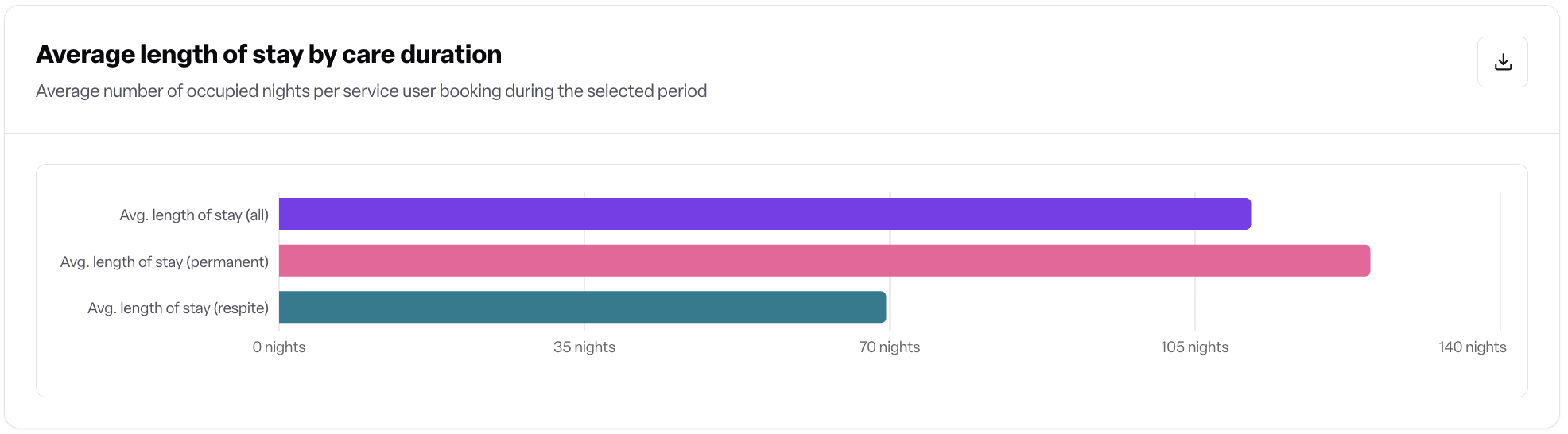
The page surfaces three headline averages (all stays, permanent, respite), a trend chart over the selected period, a distribution chart showing how stays are spread across length buckets, and a by-location breakdown table.
What it shows
Headline metrics (nights)
All — average length of stay across every qualifying booking.
Permanent — average for bookings recorded as permanent.
Respite — average for bookings recorded as respite.

Each metric displays the current value plus an up/down trend versus the previous equivalent period.
Trend chart — average length of stay plotted across the selected time range, optionally split by care type or funding type.
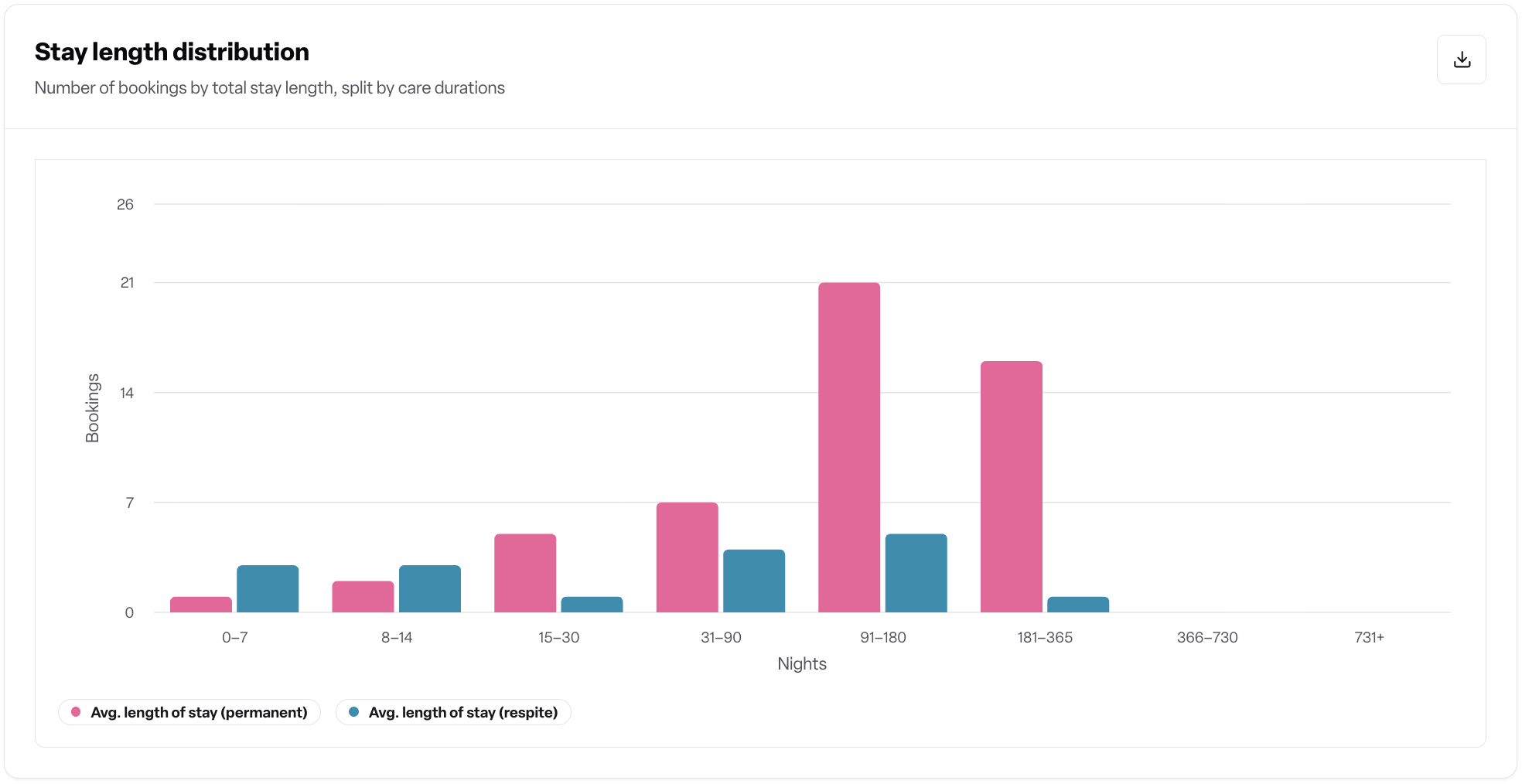
Distribution chart — the spread of stays across these length buckets, split by permanent and respite:
0–7 nights
8–14 nights
15–30 nights
31–90 nights
91–180 nights
181–365 nights
366–730 nights
731+ nights
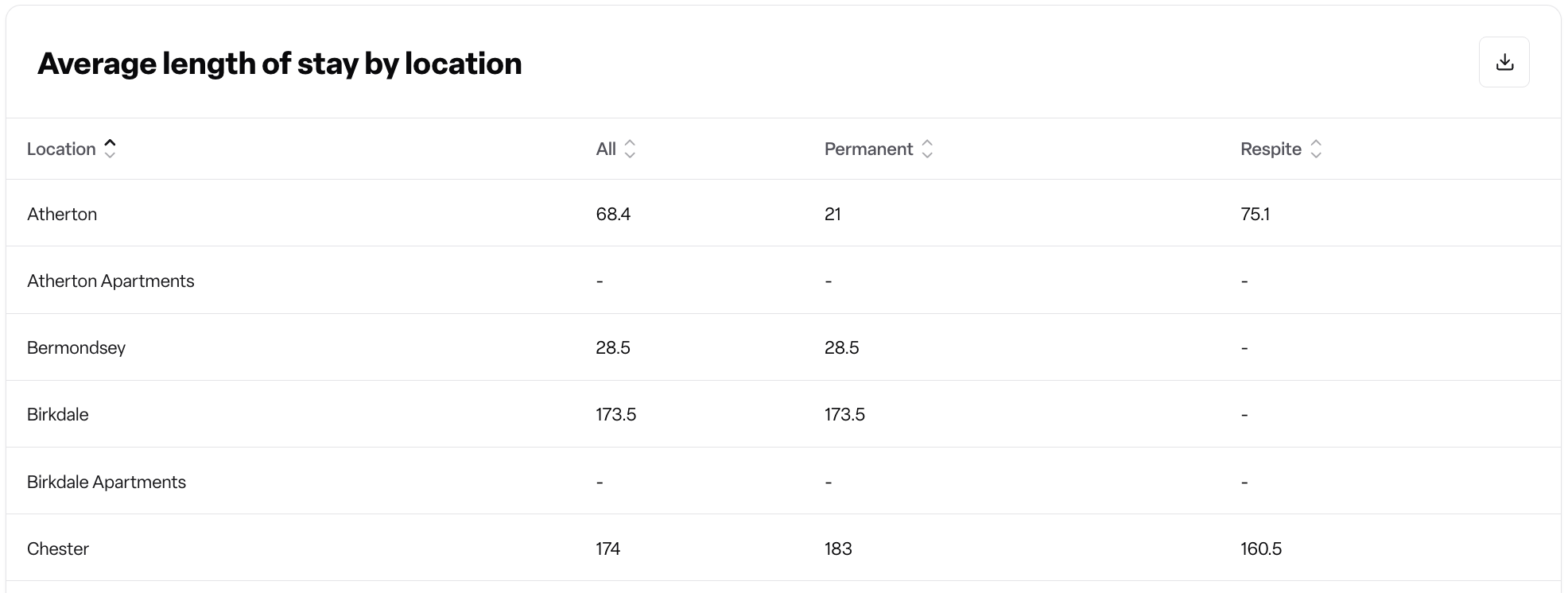
By location table — average nights for each location (All / Permanent / Respite), with an optional breakdown column when a breakdown is selected.
Where it is
Lottie CRM main navigation → Reports → Occupancy → Length of stay.
It sits alongside the other occupancy reports (Occupancy rates, Agreed fees, Funded care applications, Move-ins and move-outs).
How to use it
Open Reports > Occupancy > Length of stay.
Set the time range at the top of the page. The maximum range is 365 days and the end date cannot be in the future.
Use the location and category selector to narrow to specific homes or location categories. Leaving it empty includes every location you have access to.
Optionally choose a breakdown — Care type or Funding type — to split the chart, distribution and table by that dimension.
Read the headline cards for the average nights and the trend versus the previous period.
Use the trend and distribution charts to see how stays are spread and how the average is moving.
Scroll to the by location table to compare homes. Sort or export the table for further analysis.
How it works
The report counts bookings that started on or before the selected end date and were active during the selected period. For each booking it calculates the number of nights from the booking start date to its effective end date.
If a booking has ended, its actual end date is used.
If a booking is ongoing, the end date is capped at today, so ongoing stays don't run past the current date.
If a booking has a fixed planned end date, the smaller of the planned end date and today is used.
The report excludes:
Day-care bookings.
Cancelled bookings.
Bookings that start after the selected period.
Soft-deleted bookings.
When a breakdown is applied, each booking is grouped by its funding type or care type as recorded at the booking start date. A stay has one length-of-stay number, so it is assigned to the value that was effective when the resident was admitted. Bookings with no funding or care type recorded at admission appear under Unknown.
The previous-period comparison uses the equivalent length of time immediately before the selected range.
Frequently asked questions
Q: Where do I find the length of stay report? A: Go to Reports > Occupancy > Length of stay in the main navigation.
Q: What unit is the average shown in? A: Nights. Each metric and table value is the average number of nights for the selected bookings.
Q: Which bookings are included in the average? A: Bookings that started on or before the end of the selected period, were not cancelled, and were not day-care stays. Soft-deleted bookings are excluded.
Q: How is the length of stay calculated for someone who is still resident? A: Their stay is measured from the booking start date up to today. Ongoing stays are capped at today so they do not project into the future.
Q: How is the previous-period comparison calculated? A: It uses the equivalent length of time immediately before your selected date range, so a 30-day selection is compared with the 30 days before it.
Q: Why do permanent and respite have separate averages? A: The two stay types behave very differently. Splitting them out makes the report meaningful — a low respite average mixed with long permanent stays would otherwise hide what's really happening.
Q: What does the "Unknown" group mean when I break down by care type or funding type? A: It represents bookings where the care type or funding type was not recorded at the booking start date. A stay is grouped by the value that was effective at admission.
Q: Why is my date range limited to 365 days? A: The report is built for operational reviews of up to a year. For longer trend analysis, run the report for consecutive periods and compare.
Q: Why can't I see the report in my menu? A: You either don't have view access on Occupancy reports, or your workspace does not have the report turned on. Speak to your workspace administrator or your Found account contact.
Q: Why does the page show an upsell screen instead of the report? A: Your workspace has access to Lottie CRM but the Occupancy reports module or the Average length of stay report is not yet enabled. Contact your Found account contact to enable it.
Q: Can I export the data? A: Yes — the by-location table supports export from the table toolbar.
Q: Does the location filter respect my permissions? A: Yes. You can only filter by, and see data for, locations you are permitted to view.
Q: Are cancelled or day-care bookings counted? A: No. Both are excluded so the average reflects genuine stays only.
Q: If a resident's funding type changes mid-stay, which one is used in the breakdown? A: The funding type recorded at the booking start date. Length of stay is a single number per stay, so the report uses the value that applied at admission rather than time-slicing.