Excluding a contribution from the weekly fee
Last updated: September 4, 2026
Overview
When adding a billing contract subscription to a booking, sometimes that won't contribute towards the bookings weekly fee, meaning it shouldn't count towards the weekly contributions total — for example, 1:1 care. Marking a subscription as excluded removes its contribution from the weekly contributions total. Everything else about the subscription, including invoicing, carries on exactly as before.
The one thing to remember: excluding a contribution only changes reporting. It does not change what gets invoiced.
How to do it
Open the resident's booking.
Go to the Funding tab, then the Subscriptions section.
Find the subscription you want to change and open its actions menu.
Select "Exclude from the weekly fee" and confirm.
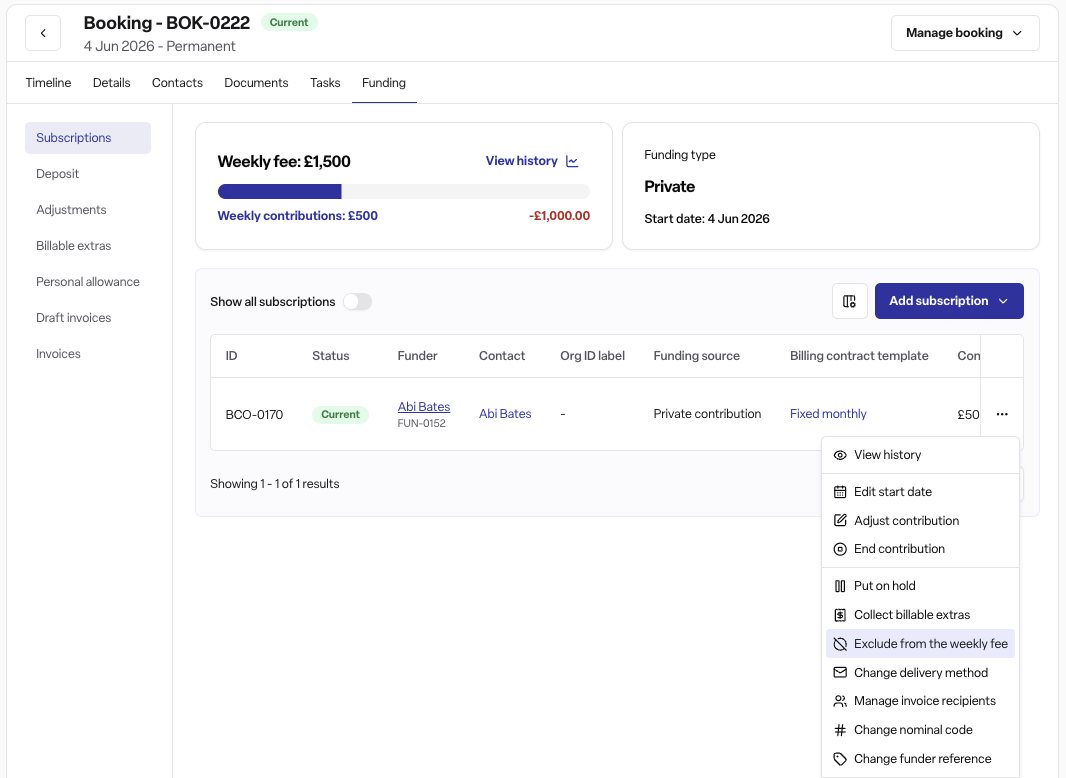
The change applies straight away. The subscription shows a small icon afterwards — hovering over it explains that it no longer contributes to the weekly fee — and the change is recorded in the booking's activity log as "Weekly fee contribution changed."
To reverse it: follow the same steps and select "Include in the weekly fee" instead. The contribution is added back into the total immediately.
Rules
You can't exclude or include a contribution on a subscription that has already been cancelled.
You can't make this change while the booking is locked — it must be unlocked first.
Each subscription is set independently, so a booking with several subscriptions can have some included and some excluded at the same time.
Frequently asked questions
Q: Does excluding a contribution change what the resident or funder is invoiced? A: No. It only changes the reported weekly fee total. Invoicing carries on exactly as it did before.
Q: Where does the exclusion actually show up? A: In weekly fee reporting, such as average weekly fee and expected-versus-actual billing figures, and in booking exports. The subscription also shows a small icon once excluded.
Q: Can I exclude a contribution from a cancelled subscription? A: No. Found blocks the change and shows an error if the subscription has already been cancelled.
Q: What if the booking is locked? A: The change is blocked until the lock is removed, the same as other subscription edits on a locked booking.
Q: Is this a resident-level setting? A: No. It applies to one subscription at a time, so a resident with several subscriptions on one booking can have some included and some excluded.
Q: Do I need to record a reason for excluding a contribution? A: No. There's no reason field — only the fact that the setting changed is recorded, along with the before and after state.
Q: Who can make this change? A: Admin, Manager and Staff users with permission to edit billing subscriptions, in a workspace with the billing module (Found Pro) enabled.
Q: How do I undo it? A: Open the same actions menu on the subscription and select "Include in the weekly fee." The contribution is added back into the total straight away.