Enquiry attribution data
Last updated: April 13, 2026
Overview
Digital attribution tells you how an enquiry reached you — automatically and accurately. Rather than relying solely on a family answering "how did you hear about us?", Found can now capture two complementary pieces of information on the same enquiry:
Digital attribution — automatically derived from tracking signals embedded in the URL (such as Google click IDs, UTM parameters, or marketplace integrations). This tells you the true digital origin of the enquiry: which platform, channel, and campaign drove it.
Self-reported attribution — recorded by your team or submitted by the family directly, such as "word of mouth" or "local event". This reflects how the family describes finding you.
Both can now be stored on the same enquiry. You no longer have to choose one or the other — digital data is never overwritten when your team records a self-reported source.
Where to find enquiry attribution
Attribution is recorded against individual enquiry records. To view it:
From the main navigation, go to Enquiries and open the relevant enquiry record.
Select the Attribution tab from the enquiry navigation.
You will see a table listing every activity (contact point) recorded against the enquiry. Each row shows:
Column | What it shows |
Contact method | How the family got in touch (e.g. phone call, contact form, email) |
Digital attribution | Automatically derived source and channel (e.g. Google — Paid Search) |
How did they hear about us? (Self-reported) | What the family or your team said was the source (e.g. Word of mouth) |
Date | When the activity occurred |
Click any row to expand it and reveal the underlying tracking detail — UTM source, UTM medium, UTM campaign, UTM term, UTM content, and any click IDs (gclid, fbclid, msclkid).
Rows are labelled Original source (the first activity on the enquiry) or Additional source (any subsequent activities).
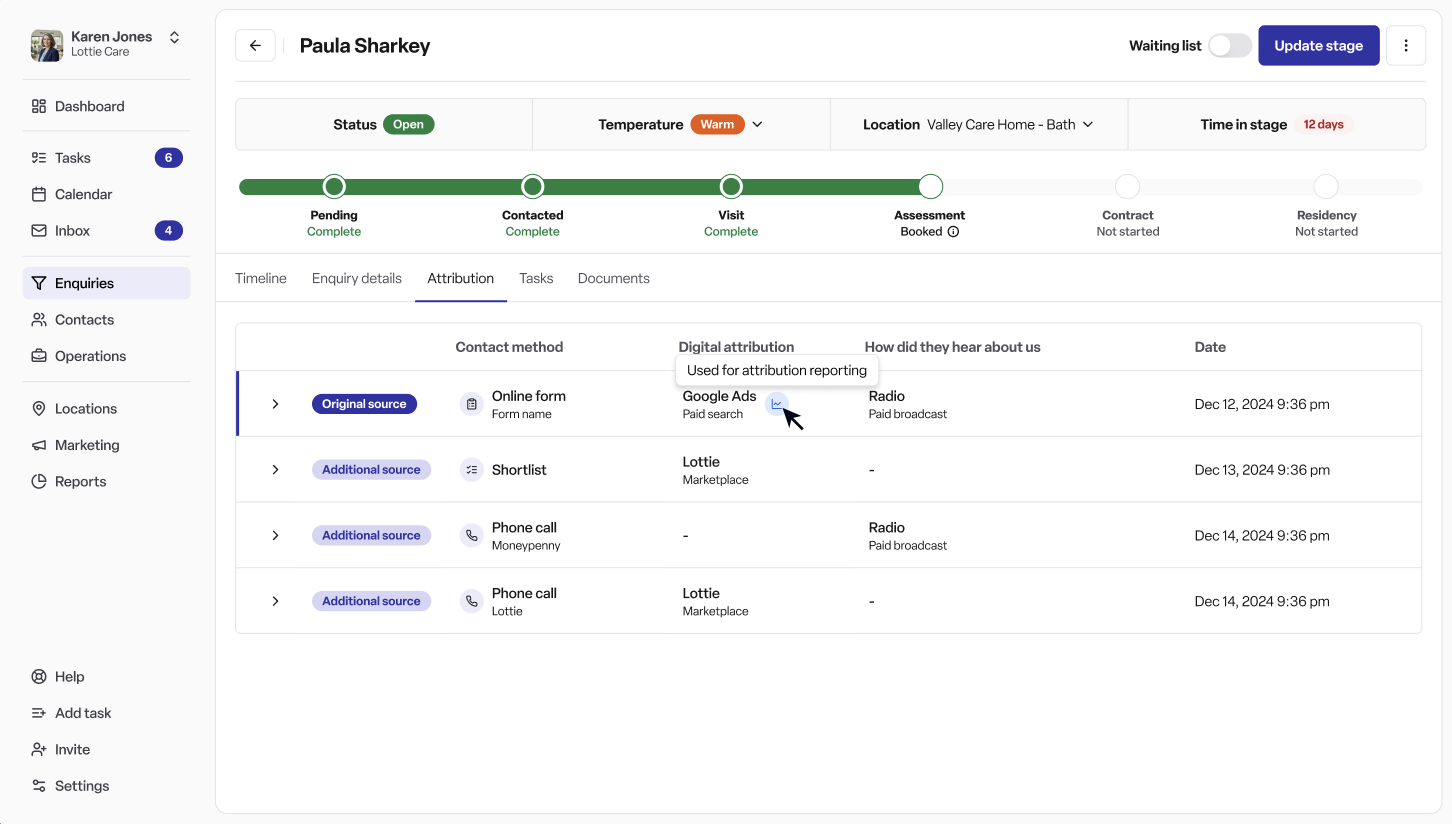
The different attribution types
Digital attribution
Digital attribution is set automatically — your team does not need to enter it. Found derives it from tracking signals captured when the enquiry was submitted:
Click IDs — the most precise signal. Captured automatically when present in the enquiry URL:
gclid— Google Ads click ID, maps to Google Paid Searchfbclid— Facebook/Meta click ID, maps to Facebook Paid Socialmsclkid— Microsoft Advertising click ID, maps to Microsoft Bing Paid Search
UTM parameters — standard marketing tracking tags appended to URLs:
utm_source— the platform (e.g. google, facebook, carehome.co.uk)utm_medium— the channel type (e.g. cpc, organic, paid-social)utm_campaign— the specific campaign nameutm_term— the search term (paid search)utm_content— the ad variant
Marketplace integrations — enquiries received via Autumna, Carehome.co.uk, Homecare.co.uk, or Lottie are automatically tagged as marketplace sources without needing UTM parameters.
Every digital attribution is expressed as a channel → subchannel → source hierarchy. For example: Paid → Paid Search → Google.
Self-reported attribution
Self-reported attribution is what a family tells you — or what your team records — about how they found you. It is selected from a predefined list of sources grouped into categories:
Marketplace — e.g. Carehome.co.uk, Autumna, Lottie
Search engine — e.g. Google, Bing
Social media — e.g. Facebook, Instagram, LinkedIn
Care regulator websites — e.g. CQC
Offline marketing — e.g. print, brochure, broadcast
Community event — e.g. open day, trade show
Referral / recommendation — e.g. word of mouth, GP referral, professional referral
Previous customer
Other
Your workspace admin can enable or disable specific sources for your organisation via Settings → Attribution sources.
Contact method
Each activity also records how the family made contact — separate from where they came from:
Phone call
Email
Contact form
Live chat
Viewing request
Walk-in
Shortlist referral
Voicemail
And others
Editing attribution
Where enabled, your team can edit attribution on an activity using the pencil icon on the right-hand side of the attribution table. The edit panel allows you to update:
Date and time of the activity
Method of contact
Self-reported source (how did you hear about us?)
The digital attribution field is shown in the panel as read-only — it is derived automatically from tracking data and cannot be manually overridden.
Your existing data
Historical enquiries are being migrated automatically — no action is needed from your team. Where full tracking data was not available, sensible assumptions have been applied (for example, an enquiry previously recorded as "Google" will be mapped to Google Organic).
Improving attribution accuracy
If you want more precise digital attribution — particularly for paid campaigns — ensure UTM parameters or Google click IDs (gclids) are being passed through your enquiry forms. Contact your Found account team for help with this.
New attribution reports (coming soon) will let you drill from channel → subchannel → source → referring individual.
Frequently asked questions
Q: What is the difference between digital attribution and self-reported attribution? A: Digital attribution is captured automatically from tracking signals in the URL (such as UTM parameters or Google click IDs) and tells you the true digital origin of an enquiry. Self-reported attribution is what the family says when asked "how did you hear about us?" — recorded by your team or submitted via a form field. Both can now be stored on the same enquiry.
Q: Can I have both a digital source and a self-reported source on the same enquiry? A: Yes. Found now stores both independently. Recording a self-reported source (e.g. "word of mouth") will not overwrite the digital attribution data.
Q: Where do I find attribution for an enquiry? A: Follow these steps:
From the main navigation, go to Enquiries and open the relevant enquiry record.
In the enquiry navigation, select the Attribution tab.
You will see a table listing every activity (contact point) recorded against the enquiry.
Each row shows the contact method (e.g. phone call, contact form), digital attribution (e.g. Google — Paid Search), self-reported source (e.g. word of mouth), and the date of the activity.
To see the underlying tracking detail — such as UTM parameters or click IDs — click on any row to expand it.
Q: Can my team edit the self-reported source? A: Yes — use the pencil icon on any row in the attribution table to open the edit panel. You can update the self-reported source, contact method, and date. Digital attribution is read-only as it is derived from tracking data.
Q: What happens if there is no digital attribution on an enquiry? A: If no UTM parameters or click IDs were present when the enquiry was submitted, the digital attribution column will show a dash. Self-reported attribution can still be recorded manually.
Q: How are marketplace enquiries attributed? A: Enquiries received via Autumna, Carehome.co.uk, Homecare.co.uk, or Lottie are automatically attributed to the relevant marketplace source without needing UTM parameters.
Q: Do I need to do anything about my historical enquiries? A: No. Historical enquiries are being migrated automatically. Sensible assumptions have been applied where full data was not available — for example, enquiries previously recorded as "Google" have been mapped to Google Organic.
Q: What are UTM parameters? A: UTM parameters are tags added to the end of a URL that identify the source, medium, and campaign driving traffic. For example: ?utm_source=google&utm_medium=cpc&utm_campaign=summer-2025. They are the industry-standard method for tracking where digital visitors come from. If you run paid campaigns and want accurate attribution, ensure your forms are set up to capture these — your Found account team can help.
Q: What is a gclid? A: A gclid (Google click ID) is a parameter automatically appended to URLs by Google Ads when someone clicks on one of your ads. It allows Found to attribute an enquiry specifically to a Google paid search click, with greater precision than UTM parameters alone.
Q: Can I control which self-reported sources appear in the dropdown? A: Yes. Workspace admins can enable or disable specific sources via Settings → Attribution sources. Only enabled sources will appear when your team records a self-reported source on an enquiry.
Q: When will attribution reports be available? A: Attribution reports are coming soon. They will allow you to drill from channel → subchannel → source → referring individual to understand which marketing activity is driving enquiries.