How to set up your Gmail integration
Last updated: July 23, 2026
Pro feature: This feature is available on Pro plans only. If you’d like to upgrade your plan, please contact our support team.
Overview
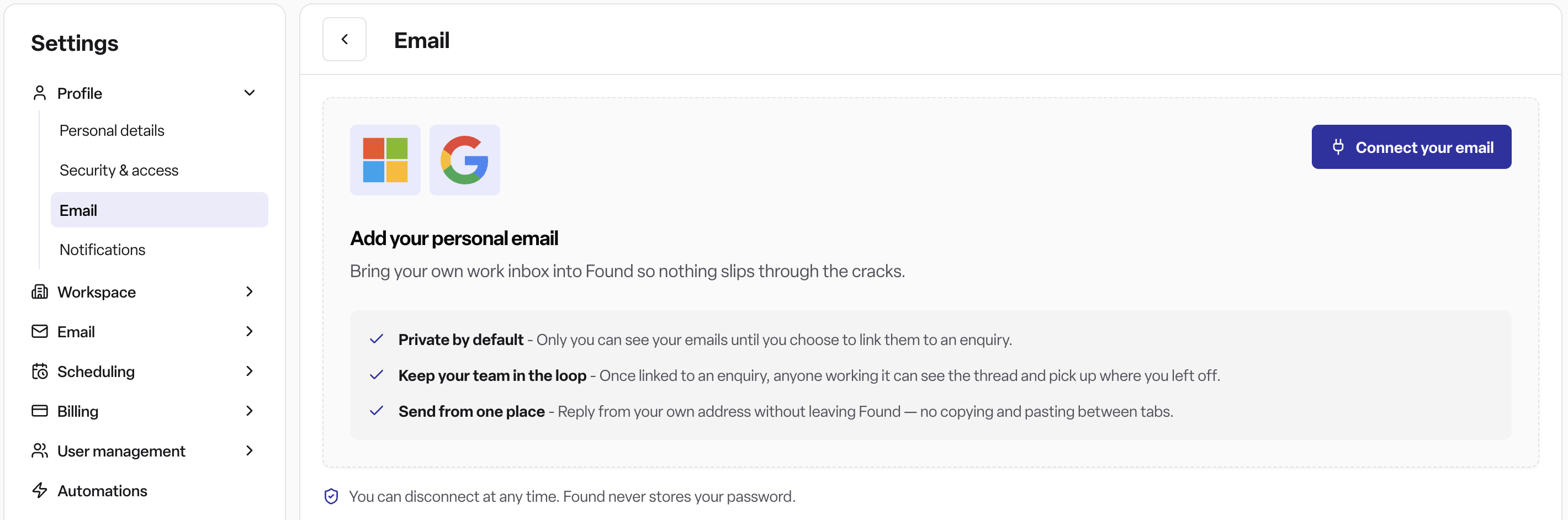
Found lets you connect your own Gmail account so your work inbox is available directly inside the platform, instead of switching between two separate apps. Once connected, you can reply to enquiries from your own email address without leaving Found, and link email threads to the enquiries they relate to so your team can see the full conversation history in one place.
Your connected mailbox is private by default — nobody else in your workspace can see your emails until you deliberately link a thread to an enquiry. Once linked, anyone with access to that enquiry can see the thread and pick up where you left off. You can only connect one personal mailbox at a time, and only you can connect or disconnect it — nobody, including an administrator, can connect it on your behalf.
Where to find it
Navigate to Settings → Profile → Email.
This option only appears in the settings menu once Email integration has been enabled for your workspace.
How to connect your Gmail account
Go to Settings → Profile → Email.
Click Connect your email.
You'll be redirected to Google's sign-in screen. Choose the Google account you want to connect.
Review the permissions Found is requesting, then confirm.
You'll see a confirmation that your email is connected, and you'll be returned to the Email settings page showing your connected address.
Once connected, you can disconnect at any time from the same page by clicking Disconnect — this stops the sync immediately, and Found never stores your Google password.
The "Google hasn't verified this app" warning
While Found is going through Google's app verification process, you may see a warning screen during step 3 that says "Google hasn't verified this app." This is expected and not a sign that anything is wrong — it appears for any app that hasn't yet completed Google's (often lengthy) verification review.
To continue safely:
Click Advanced on the warning screen.
Click Go to Found (unsafe).
Continue signing in as normal.
The "unsafe" wording is standard for any unverified app and doesn't indicate an actual security risk — it will disappear once Found's Google verification is complete.
Permissions
Requires a Found Pro plan (Email integration is a Pro System module).
Controlled by the Email integration module, which a workspace admin must have enabled.
Admin, Manager, and Staff users can all connect and manage their own personal mailbox — there's no extra role restriction. Each user can only connect and disconnect their own mailbox, never anyone else's.
Frequently asked questions
Q: Do I need a Found Pro subscription to connect my Gmail account? A: Yes. Email integration is only available on Found Pro plans. Contact our support team if you'd like to upgrade.
Q: Who can see my connected emails? A: Only you, until you link a specific thread to an enquiry. Once linked, anyone with access to that enquiry can see the thread.
Q: Does Found store my Google password? A: No. Found never stores your password — the connection uses Google's secure sign-in, and you can disconnect at any time.
Q: Can I connect more than one mailbox? A: No. You can only have one personal mailbox connected at a time.
Q: What happens if I click Disconnect? A: Your mailbox stops syncing with Found immediately. You can reconnect at any time by going through the connect steps again.
Q: Why can't I see the Email option under Settings → Profile? A: This means Email integration hasn't been enabled for your workspace yet, or you don't have a Found Pro plan. Ask your workspace administrator or contact Found support.
Q: Why do I see "Google hasn't verified this app" when connecting? A: This is expected while Found is going through Google's app verification process. It's not a sign of a problem — click Advanced, then Go to Found (unsafe) to continue.
Q: Is it actually safe to click "Go to Found (unsafe)"? A: Yes. The warning appears for any app Google hasn't finished verifying yet, regardless of how safe it is. It will stop appearing once Found's verification is complete.
Q: Can someone else connect my Gmail account for me? A: No. Each user must connect their own mailbox — an administrator cannot do this on your behalf.
Q: What can I do once my Gmail account is connected? A: You can reply to enquiries from your own email address without leaving Found, and link relevant email threads to the enquiries they relate to.
Q: Will my unlinked emails ever become visible to my team automatically? A: No. Emails stay private to you until you choose to link a thread to an enquiry.
Q: How often does my email sync? A: In near real-time. Connecting your Gmail account starts a live sync (a "Gmail watch"), so Found is notified as soon as new mail arrives rather than checking on a schedule.
Q: Can I see unread email counts in Found? A: Yes. Once connected, unread messages in your mailbox — including any already linked to an enquiry — count towards Found's email unread indicators.
Q: What happens to emails I'd already linked to an enquiry if I disconnect? A: They stay visible on that enquiry's timeline. Disconnecting only stops new mail syncing — it doesn't remove threads you've already linked.