Call logs
Last updated: July 27, 2026
Eliza feature: This feature is available as part of the Eliza module only. If you'd like to upgrade your plan, please contact your account manager.
Overview
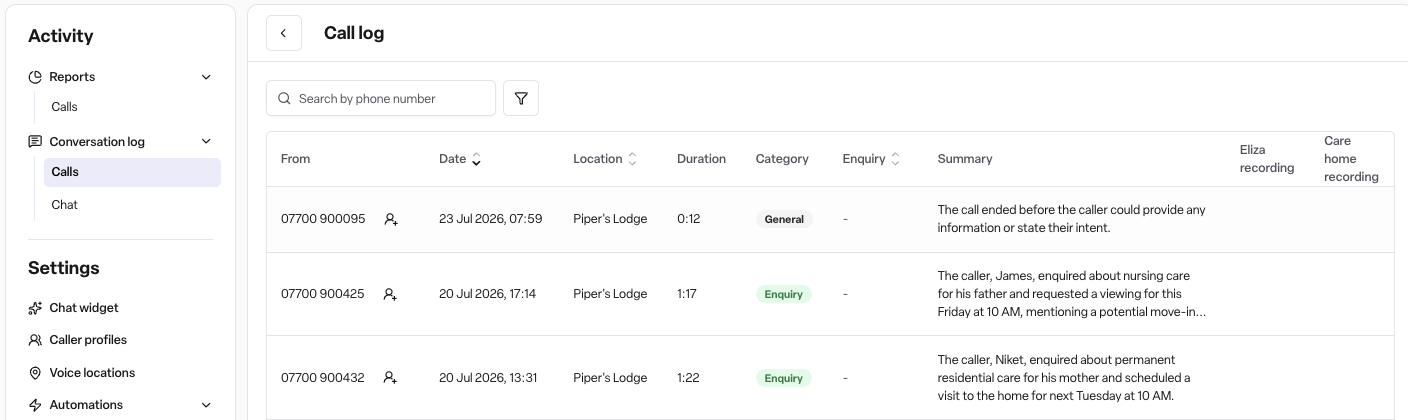
The Call log is the record of every call Eliza answers for your homes. Each call is logged with its recording, transcript, an AI-written summary, a category, and the outcome - so your team can review any conversation, catch anything that needs follow-up, and hear exactly how Eliza represents your home.
By default the Call log is visible to everyone on your team.
Where to find it
Navigate to Eliza → Call log. If your workspace also uses Eliza live chat, the menu shows Conversation log instead, with Calls and Chat tabs.
How it works
The call log
Each row shows the caller's number (From), the Date, Location, Duration, the call's Category, a linked Enquiry where one was created, and a short Summary. The final columns let you download the Eliza recording and, for transferred calls, the Care home recording.
Search by phone number to find a specific caller.
Filter by Location or Category to narrow the list.
Callers you've saved as caller profiles appear by name instead of a raw number - and you can save a new caller directly from any row.
Opening a call
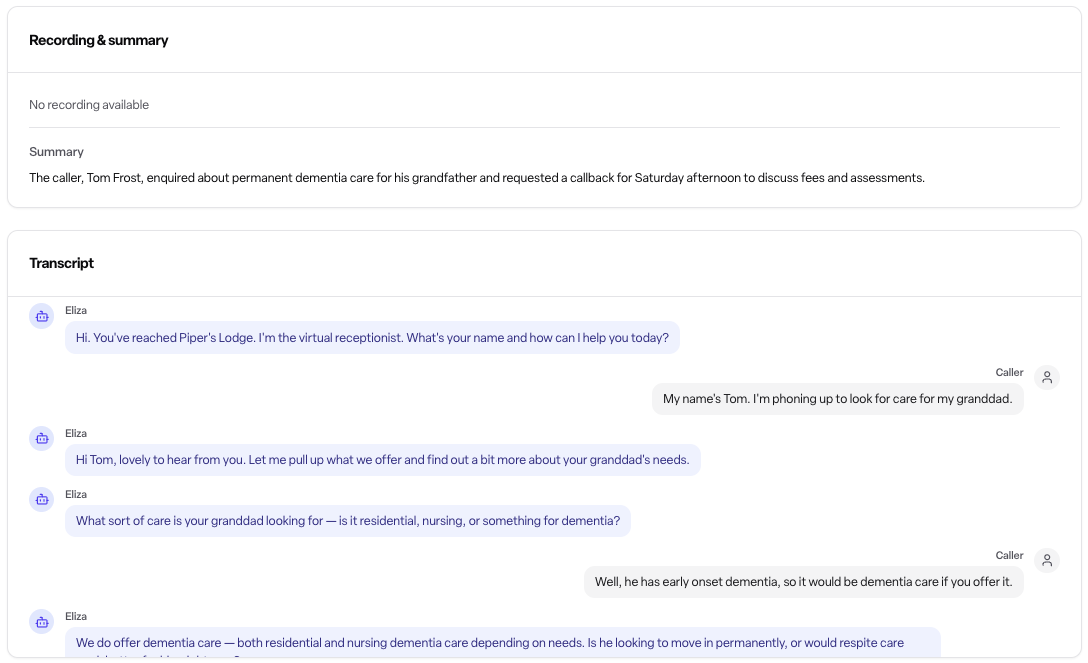
Select a row to see the full conversation in three parts:
Recording & summary - the audio player and Eliza's written summary of the call. Transferred calls have two recordings: Eliza Conversation (the caller with Eliza) and Care Home Call (the transferred part with your team).
Message taken - shown when Eliza took a message: the caller's type, name, number and company, plus their notes. For job seekers this includes role interest, experience, availability and right to work in the UK.
Transcript - the conversation word by word, labelled Eliza and Caller. Transferred calls split into an Eliza transcript and a Care home transcript.
Call details
The panel beside the conversation records the facts of the call:
Status - what happened to the phone call itself: Completed, No answer, Busy, Failed, In progress or Cancelled.
Outcome - how the conversation went: Successful, Unsuccessful or Unknown.
Category - the type of call (see below).
Enquiry - a link to the enquiry, where Eliza created one.
Next step required - Yes when the call needs your team to act; the summary and caller preferences say what for.
Caller name and Caller preferences - what the caller asked for: Callback requested, Visit requested, or Info requested with the detail.
Transferred to and Transfer outcome - where the call was sent and whether it connected (Completed, Busy, No answer, Failed or Cancelled).
Message - Yes when Eliza took a message.
Calls and your enquiries
When a call is a new care enquiry, Eliza creates the enquiry in Found for you. The Enquiry column links straight to it, and the enquiry's timeline shows the call, its recording and the AI call summary — so whoever picks up the enquiry has the full context. You can also have Eliza's messages emailed to your team automatically - see Eliza automations.
Call categories
Eliza categorises every call she answers:
Category | What it covers |
|---|---|
Enquiry | A new care enquiry |
Resident | An existing resident or their family |
Healthcare | Healthcare professionals - GPs, nurses, hospitals |
Commercial | Suppliers and commercial callers |
Staff | Staff or HR matters |
Job seeker | People asking about work |
Emergency | Emergency or urgent calls |
Complaint | A complaint or escalation |
Operational | Day-to-day operational calls |
Transfer | Callers who asked to be put straight through |
General | Calls that don't fit a category |
Permissions
The Call log is visible to all team members - Admins, Managers and Staff - by default. Admins can change this with custom roles using the Eliza conversations permission.
Frequently asked questions
Q: Why do some calls have two recordings? A: The call was transferred. Eliza Conversation is the caller speaking with Eliza; Care Home Call is the transferred part with your team. Untransferred calls have one recording.
Q: Why does a caller show as a name rather than a number? A: They've been saved as a caller profile. Saving callers puts a name and notes against their number everywhere in the Call log.
Q: What does "Next step required" mean? A: Eliza flagged that the call needs follow-up from your team - a callback, information, or a visit. Check the summary and caller preferences for what was promised.
Q: What's the difference between Status and Outcome? A: Status describes the phone call itself - whether it connected and completed. Outcome describes how the conversation went once answered.