Chat log
Last updated: July 27, 2026
Eliza feature: This feature is available as part of the Eliza module only. If you'd like to upgrade your plan, please contact your account manager.
Overview
The Chat log is the record of every text conversation Eliza has with visitors through your website chat widget. Each conversation is logged with its transcript, an AI-written summary, and a category — so your team can review any conversation and catch anything that needs follow-up.
By default the Chat log is visible to everyone on your team.
Where to find it
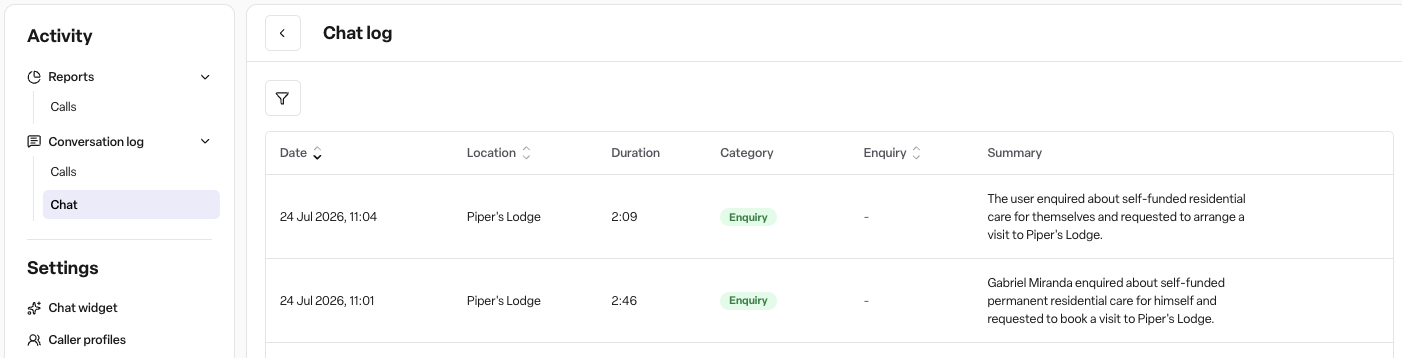
Navigate to Eliza → Chat. If your workspace also uses Eliza calls, the menu shows Conversation log instead, with Calls and Chat tabs.
How it works
The chat log
Each row shows the Date, Location, Duration, the conversation's Category, a linked Enquiry where one was created, and a short Summary.
Filter by Location or Category to narrow the list.
There's no phone number search on the Chat log — chat conversations come through the website widget rather than a phone number, so that search only applies to Calls.
Caller profiles are also a Calls-only feature, since they're built from phone numbers. Chat conversations don't have a saved-name lookup.
Opening a chat
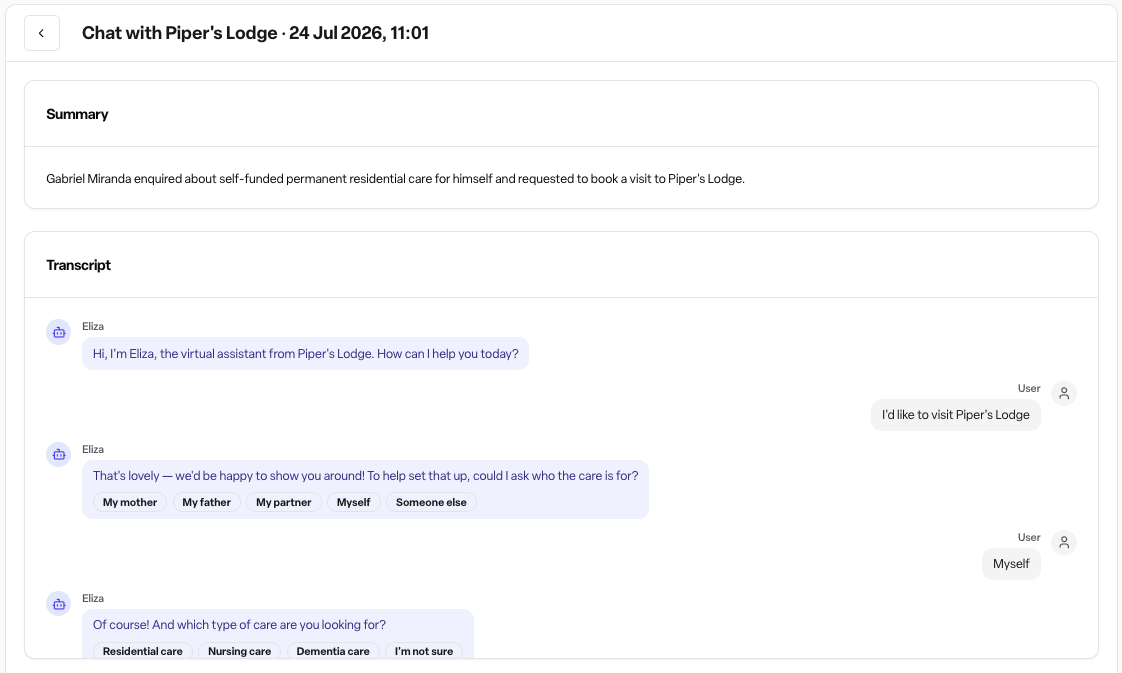
Select a row to see the full conversation in two parts:
Summary — Eliza's written summary of the chat, shown when one was generated.
Transcript — the conversation message by message, labelled Eliza and User.
There's no recording (chats aren't phone calls, so there's no audio) and no Message taken panel — that's specific to calls.
Chat details
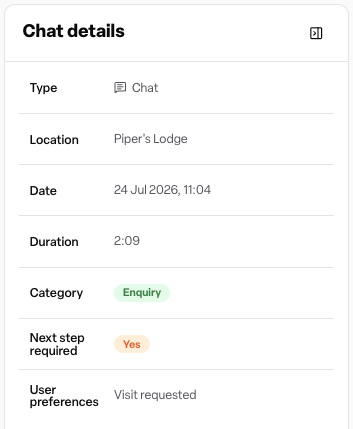
The collapsible panel beside the specific conversation records the facts of the chat:
Type — Chat, so you can tell it apart from a Call at a glance.
Location — where the chat came from, if known.
Date and Duration.
Category — the type of chat (see below).
Enquiry — a link to the enquiry, where Eliza created one.
Next step required — Yes when the chat needs your team to act.
User name and User preferences — what the visitor asked for (callback requested, visit requested, or info requested), where Eliza captured it.
Chats and your enquiries
When a chat is a new care enquiry, Eliza creates the enquiry in Found for you, just as she does for calls. The Enquiry column and the Chat details panel both link straight to it.
Chat categories
Eliza categorises every chat using the same categories she uses for calls:
Category | What it covers |
|---|---|
Enquiry | A new care enquiry |
Resident | An existing resident or their family |
Healthcare | Healthcare professionals — GPs, nurses, hospitals |
Commercial | Suppliers and commercial callers |
Staff | Staff or HR matters |
Job seeker | People asking about work |
Emergency | Emergency or urgent conversations |
Complaint | A complaint or escalation |
Operational | Day-to-day operational conversations |
Transfer | Callers who asked to be put straight through |
General | Conversations that don't fit a category |
Permissions
The Chat log is visible to all team members — Admins, Managers and Staff — by default, under the same Eliza conversations permission that controls the Call log. Admins can change this with custom roles.
Managers and Staff only see chats linked to a location assigned to them. Admins see every chat across every location.
Frequently asked questions
Q: Why is there no recording for a chat conversation? A: Chats happen through the website chat widget, not over the phone, so there's no audio to record. The transcript and summary give the full picture instead.
Q: Why can't I search chat conversations by phone number? A: Chat conversations don't have a caller phone number. Use the Location or Category filters to narrow the list instead.
Q: Why doesn't a chat show a saved caller name? A: Caller profiles are built from phone numbers, so they only apply to Calls. If Eliza collected a name during the chat, it shows under User name in the Chat details panel.
Q: What does "Next step required" mean? A: Eliza flagged that the chat needs follow-up from your team. Check the summary and User preferences for what was asked.
Q: Is the Chat log the same as the Call log? A: They're both views of Eliza conversations. If your workspace only has chat enabled, you'll see a standalone Chat log; if it also has calls enabled, both live together under Conversation log as Calls and Chat tabs.