Choose how billing adjustments appear on invoices
Last updated: October 9, 2026
Overview
When a resident's billing changes after invoices have gone out, Found works out the correction for you. Until now, you chose how to invoice each correction as it came up, and it usually went on as a single lump-sum line.
You can now set this once on the billing contract template. Found then invoices every catch-up charge, over-billing credit and backdated change on that template the same way. You choose:
Where it goes: on the next (or first) invoice, or on a separate invoice or credit note.
How it's shown: as one line, or as one line per billing period.
Why it matters: some funders, such as ICBs invoicing through Tradeshift, have strict rules about how corrections must appear. They can reject a three-month backdated rate change shown as one lump sum, but accept the same change split out by billing period. Setting the rule once per template means fewer rejected invoices and less rework. You also get the same result whoever makes the change.
What it is
Billing adjustments is a section on a billing contract template. It asks three questions, one for each type of adjustment Found calculates:
Question | When it applies |
|---|---|
How should catch-up charges be invoiced? | A subscription starts before the date it's created, so earlier periods haven't been invoiced yet. |
How should credits for over-billing be invoiced? | A subscription ends before periods that have already been invoiced. |
How should backdated changes be invoiced? | A contribution amount, subscription start date or end date is changed to take effect from a date in the past. |
Where it is
On an existing template: go to Operations > Templates, open the template, then go to the Details tab. The Billing adjustments section is at the bottom.
On a new template: the same three questions appear in the Invoice setup step when you create the template.
How to do it
Go to Operations > Templates and open the billing contract template.
On the Details tab, scroll down to Billing adjustments.
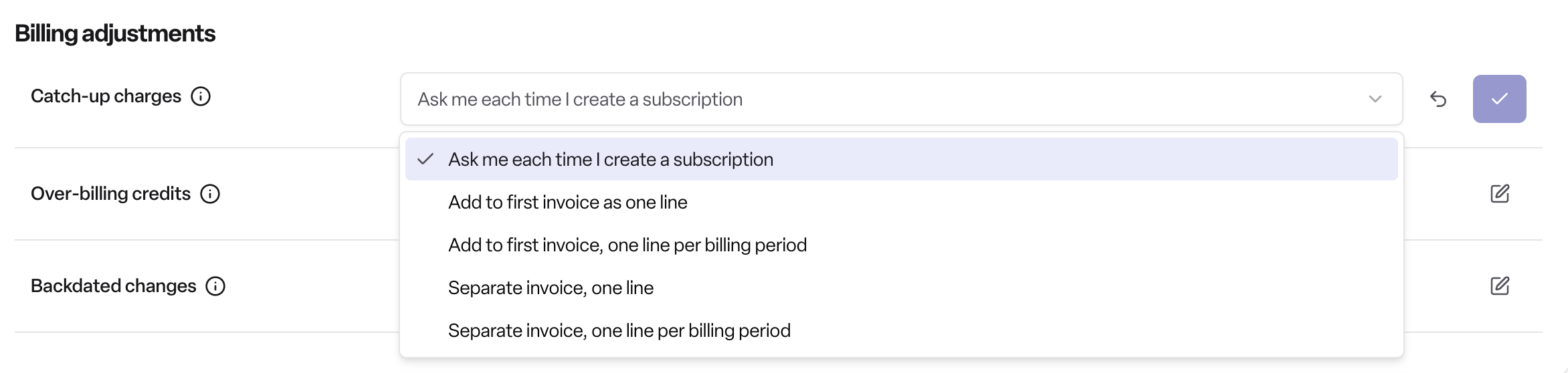
For each of the three questions, choose an answer from the dropdown. Hover over the information icon next to a question to see when it applies.
Save each change.
Options for each question
How should catch-up charges be invoiced?
Ask me each time I create a subscription (default)
Add to first invoice as one line
Add to first invoice, one line per billing period
Separate invoice, one line
Separate invoice, one line per billing period
How should credits for over-billing be invoiced?
Ask me each time I end a subscription (default)
Add to next invoice as one credit line
Add to next invoice, one credit line per billing period
Separate credit note, one line
Separate credit note, one line per billing period
How should backdated changes be invoiced?
Ask me each time I make a change (default)
Add to next invoice as one line
Add to next invoice, one line per billing period
Separate invoice, one line per change
Separate invoice, one line per change per billing period
How it works
Ask me each time is the default on every template. With this option, Found asks you how to invoice the adjustment each time it comes up, as it did before.
Any other answer sets the rule for that template. Found invoices the adjustment that way without asking you.
One line puts the whole adjustment on a single invoice line.
One line per billing period splits the adjustment into a separate line for each billing period it covers. Some funders require this.
Closing a booking works differently. Found doesn't ask you, and any credit goes on the next invoice as one credit line, whatever answer the template has for over-billing credits.
Rules
The section only appears on care fee templates in the billing module.
It doesn't appear on extras-only templates or on templates billed by booking period.
Permissions
Plan: Found Pro, with the billing module.
Users: Admin and Manager users who can add and edit billing contract templates.
Frequently asked questions
Q: Do I have to change anything for billing to keep working?
A: No. Every template starts on "Ask me each time", so Found keeps asking you how to invoice each adjustment until you choose another option.
Q: What's the difference between "one line" and "one line per billing period"?
A: "One line" shows the whole adjustment as one amount. "One line per billing period" shows a separate line for each billing period the adjustment covers. For example, a three-month backdated change would appear as three lines.
Q: Which option should I use for ICBs invoicing through Tradeshift?
A: Funders like these often reject lump-sum corrections. Choose a "one line per billing period" option, and check the funder's own invoicing rules.
Q: Can I have catch-up charges on the next invoice but credits on a separate credit note?
A: Yes. Each question has its own answer, so you can mix them.
Q: Why can't I see the billing adjustments section?
A: It only shows on care fee templates in the billing module. It doesn't show on extras-only templates or on templates billed by booking period. You also need permission to edit billing contract templates for the section to be editable.
Q: I closed a booking and wasn't asked how to invoice the credit. Why?
A: When you close a booking, Found adds any credit to the next invoice as one credit line, whatever the template is set to.
Q: Can I set these options when I create a new template?
A: Yes. The same three questions appear in the Invoice setup step when you create the template.